Campaign levels
PeopleStage can run campaigns at either the Person or Transaction Level.
Person level campaigns ensure that each message in a campaign can only send one communication per person. Deduplication is performed at the Person level and this, most typical, style of campaign works well for a marketing campaign where it is the person who is of interest.
Operational campaigns, however, often require you to send multiple communications to the same person. Take, for example, an insurance company needing to send multiple communications to the same person at the same time – perhaps a reminder for each insurance policy that is about to expire.
The levels you can use to create campaigns are set by your system administrator.
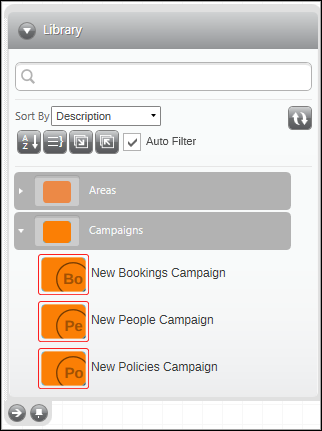
You can start a campaign by dragging the relevant New Campaign template from the Library and onto your Diagram workspace. Based on their level, PeopleStage filters out any incompatible elements, including that:
-
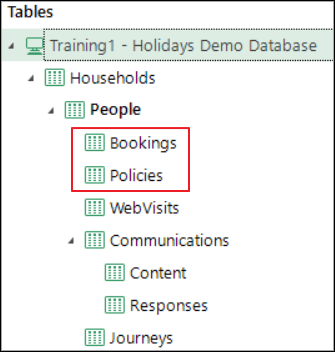
You can't use selections or variables from a table that is a sibling to the campaign table level. For example, in the Holidays system, Bookings and Policies are sibling tables and you can't add Policies' selections to a Bookings campaign.
-
Templates can't be used if they're created from a campaign of a different level. For example, a Message template created in a People Campaign can only be used in other People level campaigns.
The way in which selections and variables are used within a campaign will depend on the relationship between their levels. For example, if a transactional level variable is output from a Person campaign, you have to specify a "one per" option to determine which transaction to use. However, if a transactional variable is output in a transactional level campaign, no other information is needed.
Campaign levels and selections
| Person Level Audience Selection | Transactional Level Audience Selection | |
|---|---|---|
| Person Level Campaign | Traditional default marketing scenario: Select high value customers and send them messages that could refer to their 'most recent' or 'highest value' transaction. Each message can refer to transactional data, but only from a single transaction identified in the Content step using a "One per" option. One communication per person per Message step. | Useful single transaction scenario: Select the last transaction per person and send a sequence of messages to that person, consistently referencing the same transaction. All messages in the campaign can consistently refer to the one transaction per person identified in the Audience selection. One communication per person per Message step. |
| Transactional Level Campaign | Unusual, but supported scenario: Select all high value customers and send them a survey for each of their transactions. Potentially multiple communications per person per Message step — i.e. one for every transaction made by the person. Person level selections would more typically be used as an Exclude and would suppress all transactions by that person. | Typical operational scenario: Select all insurance policies due for renewal next month and send a separate communication for each. Potentially multiple communications per person per Message step — i.e. one for each selected policy. All messages can refer to the selected policy or to any person level data. |
Person level campaigns
To create a new Person level campaign:
- Ensure that the area you wish to add the campaign to is in Plan mode
- Drag and drop a New People campaign from the Library
The new campaign will automatically be editable, allowing you to amend its default description and add the Library elements required to create the flow of your marketing message.
For a Person level campaign, PeopleStage selects the Person eligible for the campaign. Selections can be set at the household, person or transaction level, but it will always be the person meeting the criteria who is picked, and a person will only appear once in the output file created. See Delivery output grid view.
Info
You can preview a sample of the output file using Requires Manual Approval.
Subsequent Responses will be associated with the individual targeted.
Note
Your system administrator uses icons to differentiate the different campaign levels. You see these in the Library, but the icon also appears ghosted in the bottom right of your campaign window for ease of reference.
Person Level Campaign icons:
Transaction level campaigns
To create a new Transaction level campaign:
- Ensure that the area you wish to add the campaign to is in Plan mode
- Drag and drop—for example, a New Bookings or New Policies campaign from the Library
The new campaign will automatically be editable, allowing you to amend its default description and add the Library elements required to create the flow of your marketing message.
The campaign selects the transactions identified in the initial audience selection; a transaction level selection must be used, and all eligible bookings will then flow through the campaign.
If a person has multiple eligible bookings, each one forms part of the campaign and the person receives multiple communications—one for each booking. This can be seen in the output file (Delivery output grid view) which will potentially contain multiple bookings against the same contact information.
Info
You can preview a sample of the output file using Requires Manual Approval.
Note
Depending upon how the ESP is set up, the ESP may not allow multiple entries of the same email address and will carry out its own de-dupe of the list on send. This is because the email address is the primary key.
Other ESPs use a URN as the primary key and this allows for multiple entries of the same email address to be broadcast.
When using transactional level campaigns, please check with your ESP to confirm whether it can facilitate the send.
Note
Your system administrator uses icons to differentiate the different campaign levels. You see these in the Library, but the icon also appears ghosted in the bottom right of your campaign window for ease of reference.
Transaction Level Campaign icons: